Which is the Best MacBook for Students?
It depends on the course, daily workload, and budget. A business student has different requirements than an architecture student. A medical student uses different software than a graphic designer.
For most learners, MacBook Air delivers excellent value.
- Starts quickly and lasts through a full day of classes.
- Handles research, assignments, presentations, online lectures, and multitasking with ease.
- Widely recognised as the best Apple laptop for students. They want dependable performance without carrying extra weight.
At Next Store Kuwait, we help you select the right specifications of a MacBook that matches your academic needs today and remains capable for years to come.
Which MacBook is Best for Coding?
The answer depends on the type of development you do.
If you build websites, mobile apps, or business software, MacBook Air with 16GB unified memory is an excellent choice.
- Opens development tools quickly.
- Runs multiple browser tabs smoothly.
- Also offers outstanding battery life.
If your work involves virtual machines, AI development, large codebases, or compiling complex projects, MacBook Pro is the better investment.
- Its active cooling system helps maintain performance during long coding sessions.
- Apple also offers higher memory and storage options for professional users.
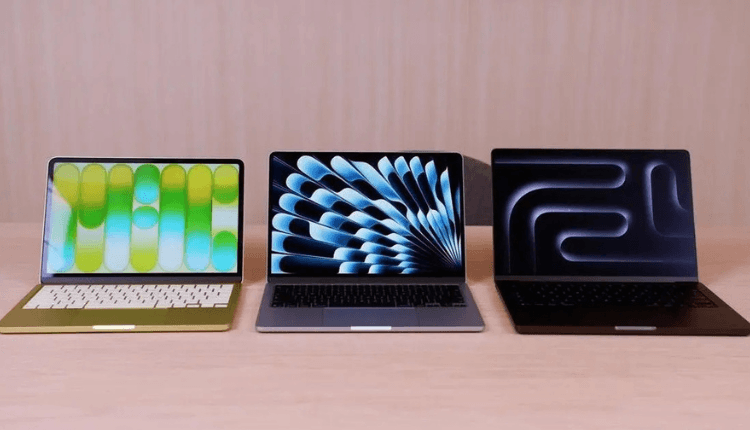
MacBook Neo vs MacBook Air vs MacBook Pro Comparison
Feature | MacBook Neo | MacBook Air | MacBook Pro |
Best For | Everyday users, Students, Light office work | Students, Educators, Business users, Frequent travellers | Developers, Content creators, Designers, Engineers, Professionals |
Performance | Entry-level | Fast for everyday multitasking | High performance for demanding workloads |
Apple Silicon | Entry-level chip (if launched) | M-series chip | Advanced M-series Pro/Max chip options |
Portability | VERY GOOD | Excellent | Very Good |
Battery Life | Very Good | Excellent | Excellent |
Display Quality | High-quality Retina display | Liquid Retina display | Liquid Retina XDR display (selected models) |
Cooling System | Fanless | Fanless | Active cooling with fans |
RAM Options | Basic configurations | 16GB and above | Higher memory configurations available |
Storage Options | SSD | SSD | SSD with larger capacity options |
Coding | Basic programming | Great for most developers | Best for large projects and professional development |
Video Editing | Light editing | Moderate editing | Professional 4K/8K editing |
Photo Editing | Good | Very Good | Excellent |
Business Use | Everyday productivity | Excellent | Excellent for power users |
Recommended Budget | Entry-level | Mid-range | Premium |
Overall Value | Good | Best value for most buyers | Best performance for professionals |
Detailed Feature Comparison
Performance
MacBook Neo is designed for everyday computing. It handles office work, web browsing, streaming, and online learning comfortably.
MacBook Air delivers faster multitasking. It is suitable for students, professionals, and many developers.
MacBook Pro offers the highest sustained performance. It is ideal for demanding creative work, software development, and professional production tasks.
Battery Life
All three models are designed for all-day use. Actual battery life depends on your workload. Lighter tasks naturally consume less power than video editing or software compiling.
Display
MacBook Neo - Quality display for everyday use.
MacBook Air - Bright and colour-accurate screen that suits students, office users and content consumption.
MacBook Pro - Most advanced display. Best for photographers, designers, filmmakers and creative professionals who require exceptional colour accuracy.
How to Choose a MacBook Based on Your Requirements
- School or university student: MacBook Air
- Parent buying a laptop for a child: MacBook Air
- Office professional: MacBook Air
- Software developer: MacBook Pro
- Video editor or graphic designer: MacBook Pro
- Everyday home user: MacBook Neo or MacBook Air
- Looking for the best long-term value: MacBook Air
- Need maximum performance: MacBook Pro
MacBook Buying Guide - What To Check Before Buying
Select 16GB unified memory for smoother performance over several years. Then, pick a 512GB SSD for photos, videos, design files, and coding projects. Next, go for a larger display for comfortable multitasking and long working hours. Further, prioritise a lighter MacBook if you travel or commute frequently. Investing more in memory or storage now helps delay future upgrades. If you have any more queries, read our Complete MacBook Buying Guide.
Why Buy from Next Store Kuwait?
Apple officially lists Next Store Kuwait as an authorized reseller. The company has served Kuwait's technology market since 2015.
We offer a wide range of Apple products. Among MacBooks, we have all models of MacBook Neo, MacBook Air, and MacBook Pro. Customers can also find Apple accessories, storage options, and different keyboard layouts – all in one place at Next Store.
We provide competitive pricing, warranty support, flexible payment options, and knowledgeable sales assistance. In short, you get what truly fits your requirements and zero forced buying.
Conclusion
There is no single MacBook that suits everyone. Compare your workload first. Then compare the specifications. Finally, buy from a trusted retailer that provides genuine Apple products and dependable after-sales support. To learn more, you can visit our store today.
Frequently Asked Questions
Is MacBook Neo good for university students in Kuwait?
Yes, it is suitable for note-taking, research, online classes, presentations, and everyday academic work.
Should I buy a 256GB or 512GB SSD?
Go for 512GB if you expect to store large files, creative projects, or development tools. It provides more flexibility over time.
Is 16GB RAM worth it?
Most customers benefit from 16GB. It improves multitasking and helps the laptop remain capable for several years.
Where can I buy a genuine MacBook in Kuwait?
You must go for an established retailer that sells authentic Apple products, provides warranty support, and offers expert guidance before purchase. Next Store stocks the latest MacBook Neo, MacBook Air, and MacBook Pro models, along with official Apple accessories.
Can I use a MacBook for programming and software development?
MacBook Air is suitable for many developers. MacBook Pro is an excellent choice for advanced programming, virtual machines, AI workloads, and large software projects.