A decent gaming experience cannot be had without a graphics card, which is a gamer's best buddy. Don't worry if you don't understand what graphics cards actually perform; they're not that difficult.
A graphics card is the part of your computer that handles the visuals, as you would have guessed. Nowadays, the majority of entry-level consumer laptops and desktops include integrated graphics or supplementary GPUs that are incorporated into the primary CPU.
But, pro-level or customized computers frequently have room for an additional graphics card. Even if a graphics card's function is intricate, understanding its fundamentals and parts is simple. To game and play the newest games, you need a graphics card and a decent one at that.
Newer games need a graphics card that can keep up because they are larger and have more sophisticated visual capabilities. The graphics card is a printed circuit board, much like your computer's motherboard.
The 2 main categories of graphic cards are:
Integrated Graphics:
Integrated graphics refers to a GPU that’s incorporated into the same device as the CPU. Although integrated graphics are sometimes mocked in enthusiast computer circles, this kind of GPU construction offers numerous significant benefits.
An integrated GPU is incorporated directly into the same housing as the CPU or an SoC. Integrated graphics are handy for light gaming, online surfing, email, and maybe video viewing. They consume less power than a discrete GPU as well.
Discreet Graphics:
A discrete GPU is one distinct from the CPU, fitted to an expansion slot available on the motherboard. It is exclusively responsible for processing all of your visuals, from the symbols you see on the computer to the rendered films, which is why it is termed discrete.
It's frequently used in conjunction with a GPU. Modern discrete GPUs often outperform integrated GPUs, however CPU and GPU generations must be taken into account.
How does a graphic card work?
A graphics card's processor termed a graphics processing unit (GPU), is comparable to a computer's CPU. Yet, a GPU is made especially for carrying out the difficult geometric and mathematical computations required for producing graphics. Some of the fastest GPUs have more transistors than the typical CPU.
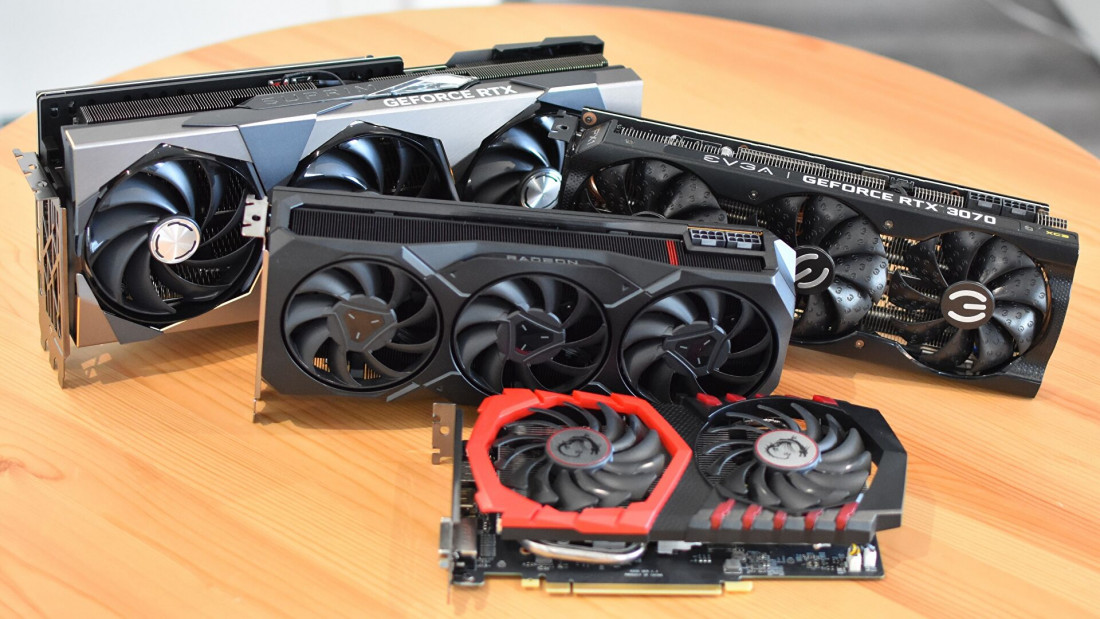
As a GPU generates a lot of heat, it is frequently placed beneath a heat sink or a fan. Extending on this a little, your graphics card transfers the instructions provided by the other applications on your computer into a visual depiction on your screen.
Thus, the CPU transmits information on what needs to display on the screen to the graphics card. The graphics card then processes those instructions through its own processing unit to quickly update its onboard memory (sometimes referred to as VRAM) regarding which pixels on the screen require modifying and in what manner.
In addition to its processing capacity, a GPU utilizes sophisticated programming to help it analyze and utilise data. The vast majority of GPUs on the market are made by AMD and Nvidia, both of which have created their own improvements for GPU performance.
How can you choose a good graphic card?
A top-of-the-line graphics card is simple to recognize. It features lots of RAM and a fast processor. In many cases, it's also more aesthetically pleasing than anything made to fit within a computer's chassis.
Several high-end video cards include attractive fans or heat sinks or are illustrated. Yet once costs start to gradually go back to reasonable levels (don't hold your breath! ), you might be curious about how to select a graphics card for your computer.
Yet a powerful card offers more power than the majority of users actually require. Those who use their computers mostly for email, word processing or social networking can find all the required visual capabilities on a CPU with integrated graphics.
The hardware of the graphics card has a direct impact on its speed. Your choice of GPU will also be influenced by its availability in the market. Verify that any possible GPU will work with your system's components.
Although an extremely fast graphics card cannot make up for a motherboard's slow data delivery, the CPU and motherboard of the machine also contribute.
The performance of the card is also impacted by its connection to the motherboard and how quickly it can receive instructions from the CPU. The greatest graphics card for gaming has a wide range of choices. Everything eventually boils down to personal choice and requirements.
Graphics cards are capable of operating at extremely high intensities, which generates a tremendous amount of heat that must be removed before it causes harm.
The GPU isn't cooled by any external gear, unlike the CPU, which is frequently the subject of supplementary cooling techniques like liquid cooling systems. This has prompted most recent GPUs to be constructed with fans built-in so that the card may be self-cooling. The technology isn't necessarily as complex, but anything with a screen requires a means to display you information.
We’ve got a large range of graphics cards available at NextStore from reputable companies and each has its own market-leading models… Go over to our website to check for yourself.