
Recently, Apple introduced new iPad 2022 and iPad Pro 2022 models that are only significantly improved over the previous year's versions. With IpadOS 16 it has greater power inside (including Apple's new M2 processor, in the case of the iPad Pro 2022).
Many devoted iPad users have been attempting to ditch their laptops in favour of Apple's tablet computer for a very long time. With iPadOS 16, it may finally happen. The laptop replacement that so many people have been waiting for may have finally arrived with the iPad.
Because of its sleek design and powerful new M2 CPU, it stands alone as one of the greatest tablets available. This tablet also supports new iPadOS 16 features including Stage Manager and Apple Pencil Hover.
Through pure shock and amazement, the previous iPad Pro was already the finest tablet on the globe, and the new iPad Pro 12.9-inch (2022) merely adds to that. You still get a gorgeous mini-LED panel with unrivalled HDR contrast and a refresh rate of 120Hz.
You still get high-end laptop power, but it's now speedier and has more powerful graphics and faster memory access for high-end software. Even with all of the extras, the design remains ultra-thin and light.
The iPadOS 16 sessions of WWDC 22 were completely crowded, in contrast to the somewhat disappointing iOS 16 portion. Finally, there is a justification for the newest iPads' switch to M1 silicon. Power users will particularly like two features, starting with desktop-class programs.
Many people now use a laptop as their primary computing device, with an external monitor for work at home or in the office. However, Apple has been trying to position the iPad as a laptop replacement for several years, and now that the latest iPad Pro and iPad Air models use the same processors as the Mac, the iPad should compete with Macs such as the current MacBook Air, Mac Mini, or 24-inch iMac.
IPad Pro 2022 as laptop:
Display and Screen
The iPad Pro 12.9-inch mini-LED screen is still unique in Apple's tablet lineup. Apple calls it an XDR Display, meaning that it's similar to an HDR (high dynamic range) screen but more x-treme. To be honest, they're not far off when compared to other tablet (or the great majority of laptops) screens.
The XDR Display is a bright and razor-sharp (2732x2048 resolution; 264 pixels per inch) work of art, delivering beautiful and accurate colours (with DCI-P3 support) and dazzling brightness in HDR applications - and, more importantly, stunning inky black tones in all applications, regardless of display technology.
It is ideal for use as a laptop replacement device. After all, 13-inch displays are common on several of the best laptops. Not only would such a screen be large enough for viewing films, playing games, and working, but it would also eliminate the need for us to carry bulky gadgets in our bags.
Performance
The M2 chip, which is an amazing beast, is certainly the primary talking point here. It has an eight-core CPU with four high-performance performance cores and four energy-efficient cores.
This is combined with 8GB of RAM in the 128GB, 256GB, and 512GB models, and 16GB of RAM in the 1TB and 2TB models. And there's a 10-core GPU that can access all of that memory as if it were its own, with a memory bandwidth of 100GB/s.
It's lightning quick at handling iPadOS in general - applications open faster than ever before, and the software was smooth and speedy throughout the time with it, never stuttering.
For those working in a wireless environment with support, the addition of Wi-Fi 6E is a great touch - this new faster Wi-Fi version hides its data from the rest of the network, ensuring stable and fast rates.
And, like the Pro in 2021, there's 5G capability, which can reach hundreds of megabits per second, but this will rely on support in your location. For context, we've seen over 300Mbps down and 60Mbps up.
Camera
The camera is the same as the previous model, except for the ability to capture ProRes video for the first time. On the back, there's a 12MP wide-angle camera and a 10MP ultra-wide camera, as well as a LiDAR sensor for rapid auto-focus and 3D scanning in various apps.
This back camera is excellent - it produces photographs with great brightness, pleasant contrast, beautiful colours, and respectable detail. However, we can't believe anyone considering ProRes video wouldn't want to capture it on the bigger sensor of the iPhone 14 Pro to acquire as much picture data as can to work with.
The front camera has a 12MP sensor and an ultra-wide lens, which means it cuts into a piece of the complete ultra-wide vision to focus on you. If you move, the camera will follow you as long as you remain inside the ultra-field wide's of vision.
It's an innovative and handy function that adapts automatically if many people are in view. The front camera also has a Face ID sensor, so it can take Portrait Mode images (as can the back camera) and unlock your iPad. The back camera can record 4K 60fps video.
The front camera can only record 1080p HD video at up to 60 frames per second. Overall, the quality is outstanding - the front camera looks amazing for video calls, especially when compared to other laptops.
Software
Stage Manager appears to be an attempt to bring something closer to macOS's windowed multitasking to iPadOS, where apps aren't as restricted in position and size as they are in Split View and Slide Over; multitasking options that iPadOS previously employed (and still employs if Stage Manager isn't enabled).
Apps can reside in overlapping windows and be resized - but only to specific sizes based on an invisible snapping grid. It's an intriguing concept, but it's lacking in a few key areas at this point. For starters, it's unstable and frequently crashes or creates unexpected effects in programs - this alone will be a deal-breaker for many pros, especially when compared to a laptop.
You may also utilize an external monitor as a secondary screen by connecting it to the iPad. This works just as well as the last example, even though it requires a wired connection. Connecting to another monitor is essential if the iPad is your primary computing device, especially if you want it to replace your laptop.
Magic Keyboard
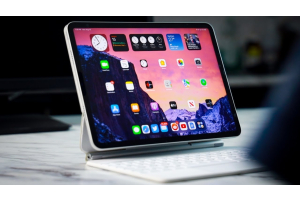
The Magic keyboard is fantastic. It has a quality appearance and feels, and the typing experience is very satisfactory. You'll need the Apple Magic Keyboard if you want to utilize your iPad as a laptop.
After all, you'll need something tangible to type on. The Magic Keyboard provides just enough room for you to type comfortably. When pushed, the keys give satisfactory resistance and have a firm 1 mm of travel.
This accessory is very easy to use because of its illuminated arrangement and decently sensitive touchpad. The Magic Keyboard performs its job well, but it could be better. As previously stated, folks with big hands may find the keyboard to be too tiny.
The on-screen little grey circle cursor is nothing near as effective or responsive as a regular arrow cursor. While the touchpad is responsive, it lacks the accuracy of a standard laptop touchpad.
It's too soon to tell if the iPad Pro 2022 will be a laptop replacement. The iPad Pro, particularly the new iPad Pro 2022, is an excellent gadget. It may function as a laptop. However, it cannot serve as your only productivity machine.
The iPad Pro is unrivalled in its ability to do virtually any work in a format designed specifically for tablet touchscreens. It's not only about the power (though that helps), but it also works nicely with a pen, keyboard, and trackpad, if you are also fascinated by apple's iPad Pro 2022, check it out now on NextStore.